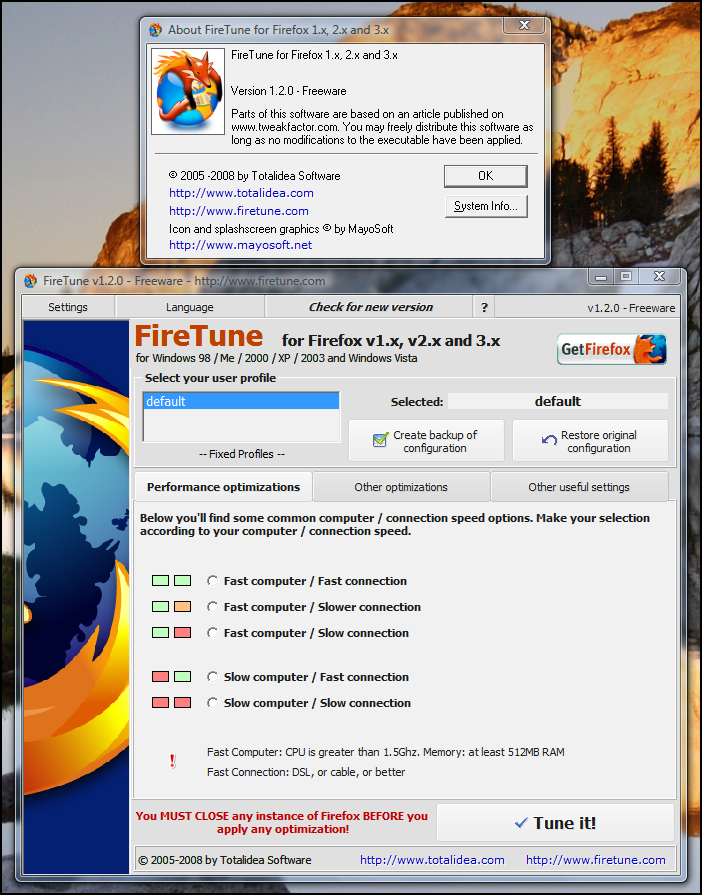
FireTune v1.2.0


Easy and fast optimization for Firefox:

Optimization with a single mouse click

Noticeable speed improvement

Freeware- just like Firefox


Get the most out of your Firefox browser.
According to your specific computer speed and internet connection speed, FireTune will optimize several internal settings of Firefox for better performance.

As easy as Firefox tweaking can be.
FireTune does NOT modify the Firefox executable, or any other Firefox binary file. Everything can be undone easily at a single mouseclick only.


FireTune for Mozilla Firefox v1.x / 2.x / 3.x was developed for an easy and fast optimization of your browsing experience with Firefox. It is based on a collection of popular and well working optimization settings used and tested by the experts. Usually you have to optimize Firefox manually, which can be time consuming and difficult for the novice user. FireTune helps you here - it includes all the performance optimizations. The only thing you must do is: make your selection. FireTune does the work for you.


What does FireTune do?

According to your specific computer speed and internet connection speed, FireTune will optimize several internal settings of Firefox for better performance. FireTune does NOT modify the Firefox executable, or any other Firefox binary file. Everything can be undone easily provided you saved your original profile configuration file with FireTune's profile backup feature before. Details on what exactly FireTune does can be found in the FireTune help file.

In most of all cases you'll notice an improved browsing speed after optimizing Firefox with FireTune.

FireTune is available for free. A free download link can be found on the 'Download' page. Please note that we do not offer product support for this product. Please read the included help file for further information.


To run FireTune on your system, you need:

Mozilla Firefox v1.x / 2.x / 3.x
Windows 98, Me, 2000, Windows 2003, Windows XP SP1 (or higher), Windows Vista the regular hardware requirements for your operating system
3 MB free space on your harddrive


Respected Forums !

bgi2vyai4tgkdvzwvx99.jpg
gu8age6bhsmh9eht1vg.jpg

Portable WinRAR v3.80 Beta 1

Image

WinRAR 3.80 Beta 1 - 1,58 MB


WinRAR is a powerful archive manager. It can backup your data and reduce size of email attachments, decompress RAR, ZIP and other files downloaded from Internet and create new archives in RAR and ZIP file format.


Features:

- Using WinRAR puts you ahead of the crowd when it comes to compression by consistently making smaller archives than the competition, saving disk space and transmission costs.
- WinRAR provides complete support for RAR and ZIP archives and is able to unpack CAB, ARJ, LZH, TAR, GZ, ACE, UUE, BZ2, JAR, ISO, 7Z, Z archives.
- WinRAR offers a graphic interactive interface utilizing mouse and menus as well as the command line interface.
- WinRAR is easier to use than many other archivers with the inclusion of a special "Wizard" mode which allows instant access to the basic archiving functions through a simple question and answer procedure. This avoids confusion in the early stages of use.
- WinRAR offers you the benefit of industry strength archive encryption using AES (Advanced Encryption Standard) with a key of 128 bits.
- WinRAR supports files and archives up to 8,589 billion gigabytes in size. The number of archived files is, for all practical purposes, unlimited.
- WinRAR offers the ability to create selfextracting and multivolume archives.
Recovery record and recovery volumes allow to reconstruct even physically damaged archives.
- WinRAR features are constantly being developed to keep WinRAR ahead of the pack.[b]


Download:
http://rapidshare.com/files/119083035/WinRARPortable.rar.html

Password:

www.forumromaniainedit.tk

A New Pics Expericence - Firefox Only


PicLens is a Firefox extension that allows you to launch full screen slideshows while browsing photos.


With piclens installed you can full-screen slideshows while browsing Google or Yahoo images or Flickr. Piclens works with sites that support media RSS. The image you clicked on opens in full screen with thumbnails for other images on the bottom of the screen.
This is a nice extension to view google or yahoo images to view in a full-screen slideshow.

See the below slideshow image for “flowers” search on google images.


Download The Addon At:
Quote:
https://addons.mozilla.org/en-US/fir...029-fx-win.

Firefox Registry tweaks (to make firefox run faster)

Pipelining Requests:
This allows for more simultaneous connections to web servers. Please note that the http specs suggest for 4 concurrent connections. Setting it to 10 allows for more webpage components to be downloaded @ the same time, noticeably improving browsing. To apply this tweak, follow these instructions:

1. Open firefox
2. In the address bar, type in about:config
3. Locate and change the following values (by double clicking on them)
network.http.max-connections = 24 (default is 24)
network.http.max-connections-per-server = 10 (default is 8)
network.http.max-persistent-connections-per-proxy = 8 (default is 4)
network.http.max-persistent-connections-per-server = 4 (default is 2)
network.http.pipelining = true (default is false)
network.http.pipelining.maxrequests = 10 ( default is 4)
network.http.proxy.pipelining = true (default is false)

3. Optionally, you can also tweak the following settings:
content.notify.backoffcount = 5
ui.submenuDelay = 0

Please Note: Setting the number of connections per server to a much higher number (over 10) can cause web servers to drop some requests, resulting in incomplete pages, increased retransmissions, etc., so it is not recommended.

Reduce Initial Page Delay
By default, Firefox waits 0.25 seconds (250ms) before beginning to draw web pages. To reduce this initial delay, do the following:

1. Open Firefox
2. in the address bar, type about:config
3. anywhere in the browser window, right click and select: NEW>STRING
4. Name the string: nglayout.initialpaint.delay (no spaces) and set its value to 0 (or something sensible, in milliseconds).

Please Note: This setting is not present by default

Additional tweaks
Note that these are most likely best left at the default values. These settings generally do no exist under the Firefox about:config, and need to be created if you'd like to experiment with them.

content.interrupt.parsing - default/recommended is true. When true, parsing can be interrupted to process UI events.
content.max.tokenizing.time recommended value ~ 2250000. Defines maximum number of microseconds between reflows.
content.notify.interval - recommended value ~ 750000
content.notify.ontimer - recommended set to true. If so, doesn't reflow pages more often than the content.notify.interva timer.
content.switch.threshold - raising the value will make the browser more responsive at the expense of page load time.
browser.cache.memory.capacity - memory, in KB reserved for caching decoded images. Default varies with RAM

Firefox 3 Beta 5 released !!

Please note: Firefox 3 Beta 5 is a public preview release intended for developer testing and community feedback. It includes new features as well as dramatic improvements to performance, memory usage and speed. We recommend that you read the release notes and known issues before installing this beta.

Firefox 3 Beta 5 is now available for download. This milestone is focused on testing the core functionality provided by many new features and changes to the platform scheduled for Firefox 3. Ongoing planning for Firefox 3 can be followed at the Firefox 3 Planning Center, as well as in mozilla.dev.planning and on irc.mozilla.org in #granparadiso.

New features and changes in this milestone that require feedback include:

  • Improvements to the user interface based on user feedback, including changes to the look and feel on Windows Vista, Windows XP, Mac OS X and Linux.
  • Changes and fixes for new features such as the location bar autocomplete, bookmark backup and restore, full page zoom, and others, based on feedback from our community.
  • Fixes and improvements to platform features to improve security, web compatabilty and stability.
  • Continued performance improvements: changes to our JavaScript engine as well as profile guided optimization continues to improve performance over previous releases as measured by the popular SunSpider test from Apple, and in the speed of web applications like Google Mail and Zoho Office.

(You can find out more about all of these features in the “What’s New” section of the release notes.)

Testers can download Firefox 3 Beta 5 builds for Windows, Mac OS X and Linux in 45 different languages. Developers should also read the Firefox 3 for Developers article on the Mozilla Developer Center.


The Story Is From:http://developer.mozilla.org/devnews/index.php/2008/04/02/firefox-3-beta-5-now-available-for-download/

You Can Download The Beta 5 Of Firefox 3 From Here:

Rapidshare Link: (English Version)
http://rapidshare.com/files/104536933/Firefox_20Setup_203.0_20Beta_205.exe

Or Use the Link Here:
Firefox 3 Beta 5

Welcome...

Welcome To The New World Of Click...
Just Click And Off You Go......!

  • WELCOME

    Welcome TO The World Of XpressClick. Where you Get The Newest And The Best.
top